
ASU Global Career Accelerator Registration Errors & Next Steps
If you're unable to register for The Global Career Accelerator, don't worry. This page explains why you may be seeing an error and outlines the steps you can take to resolve it. You'll also find contact information if you need additional support unlocking your registration.
Academic Structure & Credits
Most registration errors are due to exceeding session or term credit limits. You need room in your schedule for the 6 Global Career Accelerator credits to be added. See below for term-specific credit details:
Fall & Spring Credit Limits
If you are already registered for:
- more than 6 ASU Credits in Session A or
- more than 6 ASU Credits in Session B or
- more than 12 ASU Credits in Session C*
you will need to:
- Reduce the number of Credits you are enrolled in and/or
- Request a Credit Overload through your academic unit (subject to approval)
*Engineering majors may be enrolled for up to 13 Credits in Session C and still have room for The Global Career Accelerator
Summer Credit Limits
If you are already registered for:
- more than 8 ASU Credits during Summer
you will need to:
- Reduce the number of Credits you are enrolled in and/or
- Request a Credit Overload through your academic unit (subject to approval)
For more details on Credit Limits, click here.
For more details on the petition process, check out your college’s advising page.
How to Check for Holds & Credit Limits in MyASU
Log in to MyASU and navigate to the My Tasks section to check for any holds preventing your registration. To learn how to resolve a hold, click on the hold in your task list to view details and next steps.
Check Your Credit Limit
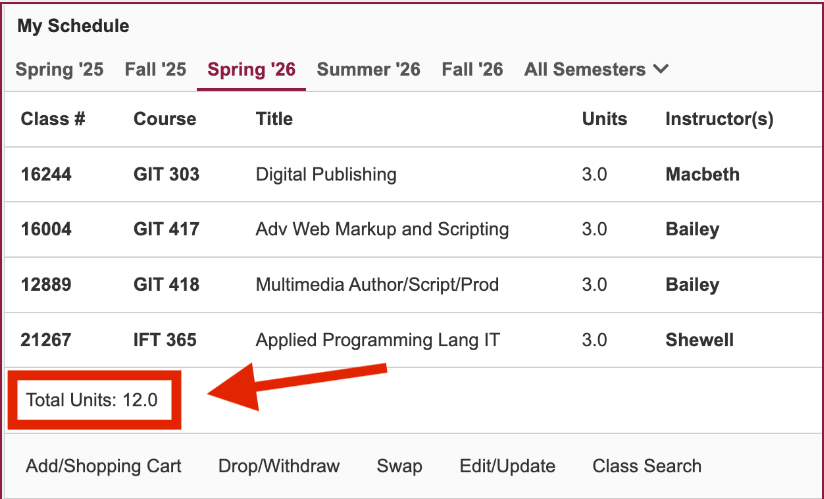
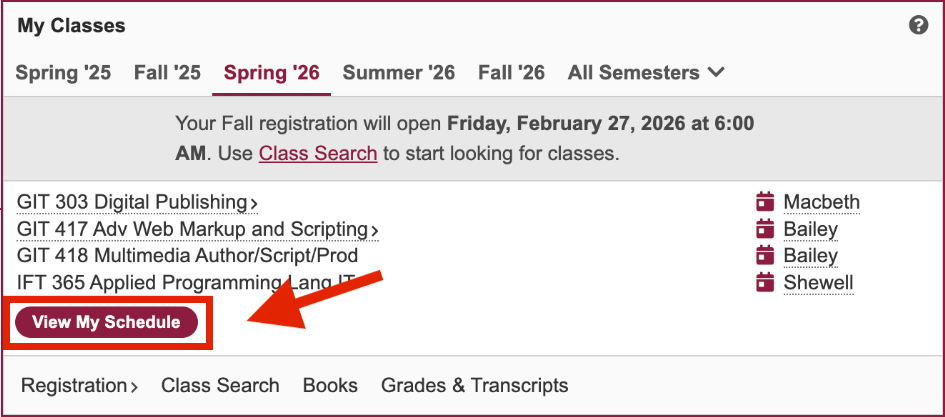
2
At the bottom, find Total Units. This is the number of credits you are registered for. You need room for 6 additional credits (see above for credit limit details)
Request a Credit Overload
If you are over your credit limit, you may need to request a Credit Overload. Start by contacting your Academic Advisor. Some colleges may also require a petition form*. Use the links below to find your college's process:
- College of Health Solutions
- New College of Interdisciplinary Arts & Sciences
- Walter Cronkite School of Journalism & Mass Communications
- Barret, the Honors College
- Sandra Day O'Connor College of Law
- Mary Lou Fulton College for Teaching and Learning
- Thunderbird School of Global Management
- Edson College of Nursing and Health Innovation
If you're unsure who your Academic Advisor is, find them in the Academic Support Team section of
MyASU, along with their contact info.
* Subject to review and approval by your academic unit
Resolve an Advising Hold
To resolve an Advising Hold, you must meet with your Academic Advisor. Log into MyASU and locate your assigned advisor under Academic Support Team. You can view contact information or schedule an appointment. For more information, please select the corresponding link below.
Before you meet with your Academic Advisor, be ready with the following:
- Your ASU Student ID Number
- Any other holds cleared
- Your Major Map reviewed
- A copy of your DARS report
- W. P Carey School of Business
- Herberger Institute for Design and the Arts
- Ira A. Fulton School of Engineering
- College of Global Futures
- College of Health Solutions
- College of Integrative Sciences and Arts
- New College of Interdisciplinary Arts and Sciences
- Walter Cronkite School of Journalism and Mass Communication
- Barret, the Honors College
- Sandra Day O'Connor College of Law
- The College of Liberal Arts and Sciences
- Edson College of Nursing and Health Innovation
- Mary Lou Fulton College for Teaching and Learning
- Thunderbird School of Global Management
- University College
- Watts College of Public Service and Community Solutions
Exploratory students should consult with
University College Explore.
Non-degree seeking students may reach out to the advising office of their desired major for futher information.
Resolve a Financial Hold
Financial Holds block registration for future classes.
Common Causes
Unpaid Tuition or Fees
- Past-Due Balance
Resolution Steps
- Log in to MyASU
- Go to Finances > Billing
- Resolve any outstanding balances
Additonal Resources
Please Note: If your hold is connected to Financial Aid documents, you may need to reach out to Student Business Services to review your account or discuss payment options.
Still Stuck? Here's What To Do
If you've completed the steps above and are still unable to register, please follow the steps below in the order listed:
1
Check your MyASU tasks for any remaining holds and who to contact
2
Contact your Global Career Accelerator Program Advisor
3
Contact the Global Education Office for help with the ASU Global Career Accelerator
ASU Global Career Accelerator Program Information
Learn more about The Global Career Accelerator based on how you attend ASU.
